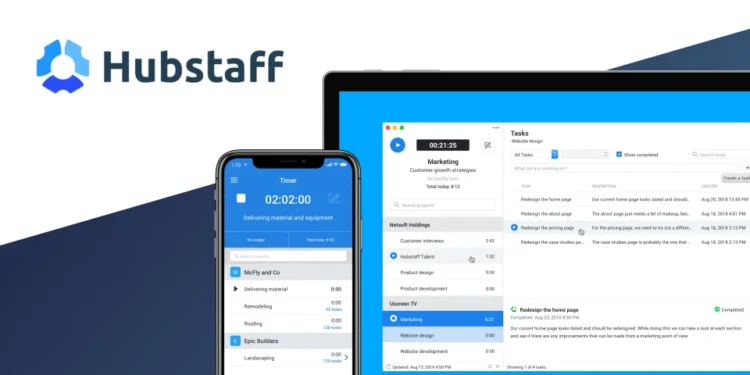
Hubstaff is a time tracking and workforce management platform that combines automatic time tracking, screenshots, activity monitoring, and payroll tools in one dashboard. For Moroccan founders and diaspora entrepreneurs coordinating remote or distributed teams across time zones, it is one way to get visibility into hours worked without relying on manual timesheets.
Key features
- Automatic time tracking through desktop, web, and mobile apps, with idle time detection
- Optional screenshots, with frequency and volume depending on the plan
- Activity levels based on keyboard and mouse input, shown alongside each time entry
- GPS and location tracking for field or mobile teams, available on higher-tier plans through the mobile app
- Payments and payroll, including automated payouts tied to tracked hours, on the Team plan and above
- Project budgets, expense tracking, and client invoicing
- Scheduling, attendance, and time-off management on higher plans
- Integrations with tools such as Asana, Trello, QuickBooks, and Slack
Pricing
Hubstaff charges per user per month, billed monthly or annually, with annual billing running cheaper per seat. A 14 day free trial is available on paid plans. There is no longer a permanent free tier for teams of more than one person.
- Starter: $7 per user per month billed monthly, around $5 per user billed annually. Time tracking, timesheets, limited screenshots and app or URL tracking, up to 5 clients.
- Grow: $9 per user per month billed monthly, around $7.50 per user billed annually. Adds more screenshots, one integration, project budgets, expense tracking, and idle time management.
- Team: $12 per user per month billed monthly, around $10 per user billed annually. Adds unlimited integrations, payments and payroll, scheduling and attendance, and workforce analytics.
- Enterprise: from around $25 per user per month billed annually, custom pricing for monthly billing. Adds single sign-on, SCIM provisioning, HIPAA and SOC 2 support, and a dedicated account representative.
All paid plans require a minimum of two seats.
Prices change over time. Figures above are based on Hubstaff’s own pricing page and support documentation.
Pros and cons
| Pros | Cons |
|---|---|
| Simple interface, reviewers describe starting and stopping tracking as a one-click action | Screenshots and activity monitoring feel invasive to some employees, with several reviewers comparing it to spyware |
| Detailed reports on hours, projects, and productivity trends | Some reviewers report inconsistent tracking, with recording stopping unexpectedly or hours logged inaccurately |
| Payments and payroll built in on higher tiers, tied directly to tracked hours | Payroll, scheduling, and unlimited screenshots sit behind the Team and Enterprise plans, which raises the real cost for a growing team |
| Wide integration list, including QuickBooks, Asana, Trello, and Slack | GPS tracking drains mobile battery for field teams, according to multiple reviews |
| Useful for distributed teams spanning several countries and time zones | Limited customization of reports and dashboards for specific workflows |
Who it’s best for
Hubstaff fits Moroccan agencies, outsourcing shops, and diaspora-run businesses that manage remote contractors or hourly staff across borders and need a documented, billable record of hours for clients or payroll. It also suits founders running field teams, such as delivery, sales, or service staff, who want location data tied to time entries. If your team is paid by the hour, works asynchronously, or includes freelancers you have never met in person, the visibility Hubstaff provides can reduce disputes over invoices and timesheets.
It is a weaker fit for teams built on trust and outcomes rather than hours, or for a culture where deep, creative work is the norm. Screenshot capture and activity levels can read as surveillance to salaried staff, and several reviewers note it can hurt morale when introduced without an honest conversation about why it is being used. If your team already works well without oversight tools, or your client contracts do not require hourly proof of work, the cost and the trust trade-off may not be worth it.
How to get started
- Sign up for the 14 day free trial and choose the plan closest to your team size and needs.
- Invite your team members and have each one install the desktop or mobile app.
- Set screenshot frequency, activity tracking, and any GPS or geofencing rules, and tell your team what is being tracked and why before they start.
- Connect the tools you already use, such as Asana, Trello, or QuickBooks.
- Review your first week of reports and adjust settings, budgets, or client access before committing to a paid plan.
FAQ
Is Hubstaff free? Hubstaff offers a 14 day free trial on its paid plans. There is no permanent free tier for teams of more than one person.
Does Hubstaff work well for teams split between Morocco and abroad? Yes. Time zones, currencies, and reporting are handled per user, which suits diaspora founders managing staff or contractors in more than one country.
Can employees turn off screenshots or GPS tracking? No. These settings are controlled by the account admin, not the individual user, so any limits on monitoring need to be set at the account level and communicated to the team in advance.
Does Hubstaff replace a payroll provider? On the Team and Enterprise plans it can automate payments tied to tracked hours, but it is not a full payroll or tax compliance service, so check whether it covers your specific obligations in Morocco or wherever your team is based.
Disclosure: Moroccopreneur may earn a commission if you sign up for Hubstaff through the links in this article. This does not change what you pay, and it does not influence which tools we choose to cover.