
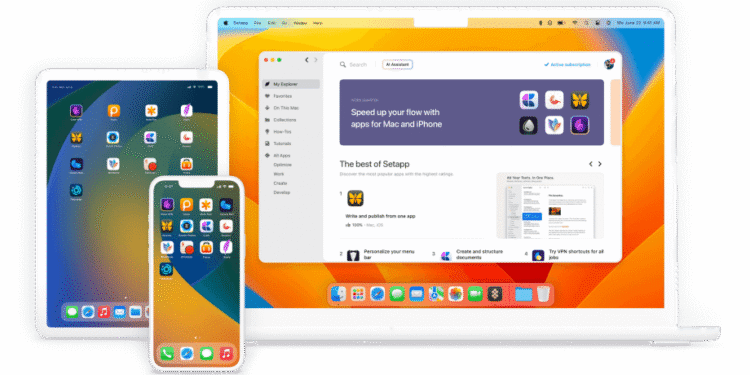
Setapp is a subscription bundle from MacPaw that gives one Mac, and on higher plans an iPhone and iPad too, access to more than 330 apps covering writing, PDF editing, system cleanup, file management, developer utilities and AI tools, all for one flat monthly fee instead of separate purchases. It suits solo founders, lean teams and ecosystem staff on Apple hardware who rely on several small utilities regularly and would rather pay one bill than track a dozen individual app subscriptions.
Key features
- A large curated catalog. Setapp lists more than 330 Mac, iOS and web apps in one membership, spanning writing (Ulysses, Craft), PDF handling (PDF Squeezer, Nitro PDF Pro), system maintenance (CleanMyMac, CleanShot X, iStat Menus), file management (ForkLift, Path Finder) and developer tools (TablePlus, Dash, DevUtils).
- Every app in the bundle updates automatically and carries no separate in-app ads or upsells, since the subscription already covers the license.
- A built-in AI allowance, 1,000 to 2,000 credits a month depending on plan, covers usage inside AI-enabled apps such as BoltAI and Elephas, without a separate AI subscription.
- Apps install and run through the Setapp desktop app, which also tracks usage and lets you add or remove apps without a new purchase each time.
- A Marketplace option lets you buy a handful of Setapp-catalog apps individually at their standard price, useful for anyone who wants one or two tools without the full membership.
Pricing
Setapp runs three plans, billed monthly or annually. The Mac plan covers one Mac with 1,000 AI credits a month for $14.99/month (about $8.99/month billed annually). Mac + iOS adds four iOS devices for $18.99/month (about $11.24/month annually). Power User covers four Macs and four iOS devices with 2,000 AI credits for $22.99/month (about $13.49/month annually). All three plans include a 7-day free trial and can be cancelled at any time. Setapp also runs separate, higher-priced AI+ plans with larger credit allowances for anyone whose main interest is the AI features rather than the wider app catalog.
A Family plan that let up to four separate people share one subscription existed previously but was discontinued for new sign-ups in 2025. Existing Family subscribers keep their plan, but anyone signing up now gets Power User instead, which covers one person’s own four Macs, not four different people.
Last verified: September 2026, against Setapp’s own pricing page (setapp.com/pricing).
Pros and cons
| Pros | Cons |
|---|---|
| 330+ apps for less than the retail price of two or three of them bought separately | Mac and iOS only. No Windows or Android version, so it doesn’t help a mixed-OS team |
| No ads, no per-app nag screens, and automatic updates across the whole catalog | The discontinued Family plan means Power User covers one person’s four Macs, not four people sharing seats |
| 7-day free trial, cancel anytime, plus a Marketplace option for buying single apps outright | Value depends on actually using several apps regularly; someone who needs only one tool usually pays less buying it directly |
| AI credits bundled into the standard plans, useful for teams already testing AI writing or automation tools | User reviews on G2 flag slow customer support response times as a recurring complaint |
| New apps added to the catalog on an ongoing basis, so the bundle keeps growing at no extra cost | Several well-known Mac apps aren’t in the catalog at all, so it never fully replaces every purchase |
Who it’s best for
Setapp fits Moroccan founders and small teams working on Mac hardware who lean on several everyday utilities: a cleanup tool, a PDF editor, a writing app, a screen-capture tool, and would rather not manage five separate subscriptions and renewal dates. Diaspora entrepreneurs running lean operations abroad get the same benefit, one predictable line item instead of a scattered set of App Store charges. Ecosystem organizations and development program staff who mostly do documentation, reporting and light due diligence work, reading PDFs, taking notes, managing files, can get real use out of the bundle too, since several of the catalog’s strongest apps sit in exactly those categories.
It’s a weaker fit for anyone standardized on Windows, since Setapp has no Windows client at all, a real limitation for teams that mix operating systems across staff. It also doesn’t suit someone who wants only one specific app rather than a broad kit: buying that single tool directly is usually cheaper than paying for the whole bundle to get it. Investors and ecosystem organizations that need enterprise-grade, seat-managed software for a whole team should look elsewhere too, since Setapp’s plans are built around one person’s own devices, not shared team licensing.
How to get started
- Go to Setapp’s site and start the 7-day free trial, no app purchase required upfront.
- Download the Setapp desktop app and sign in, then browse or search the catalog for the tools you actually need rather than installing everything at once.
- Install apps directly from the Setapp app. Each one activates through your subscription, with no separate license key to manage.
- Before the trial ends, pick a plan (Mac, Mac + iOS, or Power User) based on how many devices and which AI credit allowance you need, or cancel if it isn’t a fit.
- Add the iOS app on your iPhone or iPad if you’re on the Mac + iOS or Power User plan, using the same account.
FAQ
Is Setapp available on Windows? No. Setapp only runs on macOS and iOS, plus a small number of web apps included in the catalog. There is no Windows or Android client.
Can a team share one Setapp subscription? Not in the way a shared license usually works. The Family plan that let four people share one subscription was discontinued for new sign-ups, so the current Power User plan covers one person’s four Macs and four iOS devices, not four separate team members.
Is Setapp free? It offers a 7-day free trial, then moves to a paid plan starting at $14.99/month for one Mac. There is no ongoing free tier.
What happens to my files if I cancel? Files you created using Setapp apps stay in their normal location on your Mac, but you lose access to the apps themselves once the subscription ends, so check which formats you might still need to open before cancelling.
Disclosure: Moroccopreneur may earn a commission if you sign up for Setapp through the links in this article. This does not change what you pay, and it does not influence which tools we choose to cover.